Showing posts sorted by relevance for query pinterest. Sort by date Show all posts

Sunday, July 29, 2012

What's the Big Deal with Pinterest?

"What's the big deal with Pinterest?" my husband asked me as he saw me searching some of my pinned boards.  I didn't really have a good answer for him, until he followed up with, "why not just do a google search and specify images?"

That certainly is one way to find an image of something when you need it, however, I don't always know that I need to find something.  That's where Pinterest comes in; you don't know what you don't know so you're not going to search for it! (Those of you on Twitter probably experienced this when you realized this benefit on Twitter!)

Here's the perfect example of where Pinterst comes into your life and helps you when you weren't even searching:

Have you ever had a pair of flip-flops break? I have several times. It irritated me, but I just tossed them and bought new ones.  Never did I think to search for a way to fix them (aside from when I was at work and had to just rely on tape and walking very carefully). Well, I was checking my Pinterest feed (not even sure if it's called a 'feed' on Pinterest) and look at what I discovered:


As much as I love decorating for Christmas/winter theme, I've never really sat on google searching for innovative ways to decorate, but look what I found on Pinterest:

Fill balloons with water and add food coloring, once frozen cut the balloons off & they look like giant marbles.
So neat, right?  Or what about these ideas, that again, I don't know what I would have had to type into google to find:
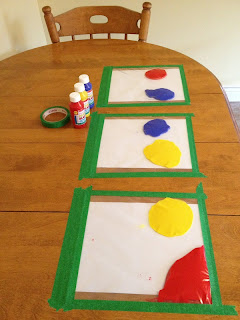
Paint in ziplock bags, taped to table. Great distraction, no mess!

Who knew aluminum foil was the key for removing food from glass dishes...Find more cleaning ideas here.

balloon powered racers
Make a family fingerprint ornament with salt dough + silver spray paint

Baking soda neutralizes the ph in the soil and nothing will grow there. use baking soda around all of the edges of flower beds to keep the grass and weeds from growing into beds. Just sprinkle it onto the soil so that it covers it lightly. Do this twice a year - spring and fall.
Hot dog spiders. Before cooking, stick pasta through hot dogs, then boil ! -Will have to try this for fun!


OK, so I do find a lot of random and neat ideas that I never would have considered searching for, but since I follow a lot of the same great educators that I follow on twitter, I find a lot of great ideas to share with my teachers, like these:
Six Classroom Questions to start off the school year!
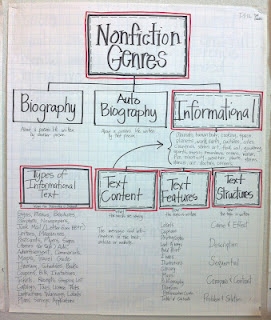
Nonfiction anchor chart
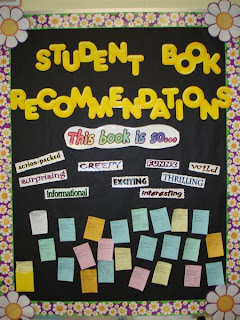
Reading Recommendation Bulletin Board
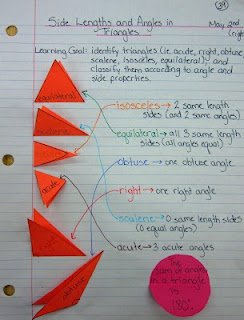
math journal entry for types of triangles and sum of angles in a triangle
Great way to display class rules, reminders, etc. Use student photos with speech bubbles
Or I've found these great images/quotes to put up on the bathroom doors:


Seriously, I probably never would have searched for any of these ideas, but in just a few minutes each day I can check my Pinterest feed and repin a few items I think staff may be interested in and share it on my Monday Memo each week.  Quite honestly, I only check Pinterest a few times a week, so in less than 10 minutes a week I find so many great ideas to share with them. When you're on Pinterest and see these images, you can also click on them to get to the original blog post/site that explains more about the image (I did not do that for this blog post).

So what are you waiting for? Start Pinning!!  Here's a great blog post to help you get started: Pinterest-My New Love for Visual Bookmarking Education and Teaching Web Content


Saturday, January 14, 2012

Web 2.0 How do I love you? Let me count the ways...


1. Twitter -Do I really need to explain twitter? Let's just say I couldn't imagine my life without twitter! This is where I learn about how any other tools can help me both personally and professionally.

2. Blogging-I keep this blog for my reflections and professional growth and also maintain a blog for my staff.

3. Google Docs-I love how easy it is to have others contribute to a document or ask someone to review something I've written before submitting it. No more emailing an attachments back and forth. No more losing a document in microsoft word when your computer auto-closes it before saving (google docs auto-saves every few seconds).
Here is a great video clip to see how beneficial google docs can be in your school:


4. Google calendar-this is the first year I've used google calendar and find it extremely useful for my useful for my secretaries to have access to my calendar-they can always see where I'm at and add new appointments to my calendar. Recently after having an issue with our computer lab sign-up on our internal network, we set up a google calendar for staff to sign up this way...for many of our staff it's their first time activating their google account and I'm hopeful that it will lead to many more uses of google apps in our building. My next goal is also for us to create an IEP calendar in our district o we make sure that there are not 2 mtgs scheduled at once that LEA representatives need to be at.

5. Google reader-I love reading blogs online and I no longer have to waste my time checking my favorite blog sites to see if there's a new post...they go straight to my google reader and I check it when I want to see what's in there. Here's a video clip I shared with staff when I showed them google reader at our Tech Tuesday:


5. Diigo -I love that I can access and add to my favorites no matter what device I'm using online. I also enjoy that i can just have the "autobots" search my tags within diigo to find what I'm looking for. There are many features of diigo that I haven't begun to use yet, sharing them in a group for example.

6. Evernote -after having an incident of losing everything in my yellow notepad on my iPad I have become an all the time Evernote user. If you don't have an iPad, you can still use evernote on your computer. It's "in the cloud" so you can access it from any device! I love that's I can organize my notes in notebooks, label them with multiple tags and that I can access the on any device. I recently learned that Evernote has a voice feature that is useful in the classroom, because the teacher could record a student reading, take notes and save it for that student's portfolio or even email the recording with a message to the parents!

7. Pinterest -this has become a new addiction that one of my teachers discovered. Basically Pinterest is a way to search for ideas, but you're just searching on others' bulletin boards and you then create your own bulletin boards of ideas. The teacher that shared this with me said she basically never uses google anymore when she's looking for an idea.

8. Podcasts-I love being able to learn from podcasts while I'm cleaning the house or working out and I have also enjoyed joining in on podcasts recording within the past year. You can find my list of podcasts here.

9. TodaysMeet is basically a chat room you can create and invite anyone in by giving them the link. I recently used this in a staff mtg as a back channel to foster more discussion.

10. Skype - I love to use this for personal and professional use

11. Google + I rarely go to Google +, however, the hangout feature is just like skype, but allows up to 10 people to join for free. There has been a regular group of us in my twitter PLN that organize times to meet in google +hangout (we've discussed the start of the school year, walkthroughs, use of evernote, etc.)

12. Facebook - I pretty much only use facebook to keep in touch with family/friends since we live out of state. I use this to post pictures of my kids so Grandma can still feel connected (it's far easier for me than emailing them out to people).

13. The Principal Center is a new online place for Principals started by Justin Baeder to join for sharing ideas and resources. This month I'm starting a book study there with several other principals. If you want to join, just let me know and I'll send you an invite (you do have to go through a process to verify that you are an administrator).

14. Screencastomatic - I have found it very easy to make quick tutorials that show staff exactly how to do something. No more screenshots/editing to make a handout that gets lost. The screencast stays on my blog and youtube channel for them to access as needed.

15. YouTube - I use YouTube for school video clips and for Screencasts. Last year we were fortunate enough to have a young lady from another country visiting her grandmother over the summer and attended our summer school program. She recently saw our summer school video clip and commented on it that she can't wait to come back to America and join us again this year!

16. Xtranomral -I have not used this, but I certainly love watching what others have made, especially what some of our 4th graders made that you can find here. I have also found some to start out a staff meeting with humor (like a funny one about parent teacher conferences).

17. Bitly.com I love using bitly to shorten web links and to customize them so they aren't just a random assortment of letters/numbers. Here's a screencast I made to show my staff how to use it:


Link
18. Shelfari - I used to use Goodreads to log my books and connect with others that have similar reading interests and find book suggestions, but I wanted to add a "widget" to my blog that shows the most recent books I've read. This isn't to brag (which my husband usually says), but it's actually after attending a conference with Regie Routman---she says it is important for teachers to share with students about themselves as readers and for principals to do the same for their staff. I thought the easiest way would be to have this on my staff blog for when they check my Monday Memo and Friday Focus each week. You can see that it is also on this blog.

19. Pandora - I'm the type of person that needs music to work, so I love being able to access my Pandora account and pick my station (especially since we don't get a radio signal in our school building).

I'm sure that I missed some tool, but as I went through my week, these are the tools I used that help me do my job and continue my learning.

Monday, December 31, 2012

Reading Resolutions - staff memo edition

In my last post I shared my learning from a full day workshop with Donalyn Miller and what ideas we will be implementing in our school as a result of this learning.  After grade level meetings and a full faculty meeting, here is a post on my staff memo that I shared with staff on Reading Resolutions.  I try to share some of my staff memo posts here, because I often gain great ideas from reading what other principals post for their staff.

My next post here will be my personal Reading Resolutions.
----------------------------------------------------------------------------------------


Some of you asked about Reading Resolutions after the staff meeting...here are the answers. If you don't want to think about it until closer to January, then save this to read later. :)

Image from BOTNS

In yesterday's staff meeting we talked about school-wide ideas to continue building a culture of readers.  We already have great literacy practices, but now we want to go further to help out students develop the habits of lifelong readers/learners.

One of the ideas I asked all of you to do is start out January creating "Reading Resolutions" with your students.  This would start with you creating your own Reading Resolutions.  I haven't written mine yet (there are still 14 days to read for 2012), however, I did write a blog post in June in which I reflected on my reading half-way through the year: HERE is the post.  In that post I noted how last year I read 20 non-fiction and only 6 fiction books and that I needed to read more fiction or I would become a really boring person!  I do not at all expect anyone to write something as long as I did for a reading resolution, but I just wanted to share that with you.

HERE is a post that Donalyn Miller wrote last year on her Reading Resolutions.

HERE is a post with some actual reading resolutions from students. HERE is another one.

I don't want to tell each of you how to do this with your class, you have to do what works for you.  I'm sure that several of you will also come up with some cutesy little form for students to fill out (and others can steal from them) and others (if it were me) might just use index cards or old-school paper.  I would share with students my own personal reflections on my reading for the year and then show them an example of what format they should write their's in (showing your own resolutions).

Thank you for all your hard work and for sharing your reading lives with students!

An idea found on Pinterest--maybe usable for 5K students?

Monday, September 3, 2012

Ready for the First Day of Bucket Filling!

I'm ready for the first day of school tomorrow and excited to kick off our Bucket Fillers theme for the year.  Here's my blog post in pictures for you (because I'm short on time)...

As students come to the doors they will see...


Our main hallway bulletin board:


This explains the bulletin board:


Here's another Bucket Filler's bulletin board (put together by our wonderful Counselor!):


My bag is packed and ready to go into classrooms to introduce Bucket Filling:


What's in my bag, you ask?  I've got the Bucket Filler's Pledge:


The book I'm reading to the classes:


A variety of books to give to the classrooms (depends on the grade level):


"Drops" to explain how students can fill buckets on our main bulletin board. I will have them write out something to someone in their home to fill their buckets at the end of the day.


I also have this letter for students to take home, explaining Bucket Filling to their parents.

And I also have a bucket full of bracelets for students to choose from. Each one says, "Have you filled a bucket today?"


I can't forget about staff.  I have finally put some of my Pinterest pins to use in the staff lounge:

Saturday, December 10, 2011

Web 2.0 and Higher Level Thinking

Each week I post a "Friday Focus" for staff on my staff memo blog as a way to model professional reflection and hopefully inspire them each week. This week I attempted to summarize what I learned from Scott McLeod at SLATE. This is a cross-post from my staff blog.
-------------------------------------------------------------------------------------------
This week I attended the SLATE (School Leaders Advancing Technology in Education) conference where I was put on brain-overload from the many challenging thoughts and great ideas shared to continue advancing integration of technology in education.

I was excited to hear our keynote speaker, Scott Mcleod, because I have followed his blog and twitterfeed for a couple of years now. Scott created the following powerful video clip:


Just as I expected, Scott spent 2 hours sharing far too much information for me to share in this post, but I do want to share the "learning nuggets" that I took home with me:

*Web 2.0 -the internet is no longer just reading information, but interacting with it, connecting with others and easily sharing information (i.e. podcasts, facebook, twitter, blogs, youtube, wikipedia, linkdin, four square, pinterest, webkinz, wordle, the list goes on...)

*Consumers vs. Creators - With all the web 2.0 tools today, we are no longer consumers of the internet, we are creators. One well known example of this is the amount of sales from amazon.com that are attributed to the product reviews that people submit. If you are submitting a review, you are helping to create amazon. He also said that if you are reading reviews, but never leaving a review, then you're a "moocher" and you need to help contribute. (With this thought, I'm making it my personal goal to try to add comments to the blog posts that I read throughout the week)

*With all these web 2.0 tools...
-We all have a voice
-We can easily find each other
-We can easily work together

*We are now preparing our students for jobs that don't currently exist.

*Our students need to be problem-solvers and critical thinkers (not "regurgitators")


*If we are going to prepare our students for the new jobs (that we don't even know about now) that require creative work, then we need to plan learning that is in the top 3 of Bloom's Taxonomy (visual above of this)--Analyzing, Evaluating and Creating.

My reflection prompt for you:
What are you doing in your classroom to encourage critical thinking, problem solving and creating? How much of student time is spent consuming information versus creating it?

Tuesday, July 17, 2012

Daily 5 School-Wide Part 2

In my last post I shared with you an update on how we have gone school wide with the Daily 5/Cafe framework for teaching literacy.  Just how committed to this are we? Well, the reading basals are now officially boxed up and in storage!!

As we made the transition to going school-wide with Daily 5, I will tell you the first mistake I made as a principal...

During the Spring of 2011, I told all staff that we would be going school-wide with Daily 5 (almost all were familiar with it so it was no major shock) I told them that all they had to worry about was reading/learning how to implement the Daily 5 framework and that the following year we would add Cafe  to all classrooms.  Several teachers had already implemented both Daily 5/Cafe and several more also read the Cafe book to implement this past year as well.  So what was the mistake in holding off for the others?  Daily 5 is the framework for what your students are doing during the literacy block and provides the structure to build up their stamina to read/write for sustained periods of time.  Cafe is the acronym for the strategies you are teaching your students--both in whole group mini-lessons, small group mini-lessons and 1:1 conferring with students. While it is extremely important to have the routines/procedures in place, building up stamina just as "The Sisters" describe in the Daily 5 book, you need the Cafe strategies to teach!
So, there's my mistake. If you go school-wide, now you know not to make the same mistake I made!

If you are considering going school-wide with Daily 5/Cafe, here are some of the things we did in our building to help make this a successful transition:

  • I created a video from our classrooms that were already using Daily 5/Cafe to share with our staff/school board.  
  • Utilize the teachers that have already started and build on their success.  Let other teachers observe in their classrooms to see Daily 5/Cafe in action.  Look at their student reading growth in comparison to other classes--if you have enough data, look at the impact on those students after the summer as well (we're finding that since the kids enjoy reading books they choose, they're continuing to read over the summer and either maintaining or increasing their reading levels versus the "summer slide.") 
  • Give all of your staff the Daily 5 and Cafe books.  Buy as many of their DVD's as you can too.  Use the books and DVD video clips for staff meetings/book clubs, discuss what you're learning and try applying in the classroom while learning (or if they're not comfortable that's when they can observe others that have already implemented). 
  • Get memberships to The Daily Cafe website If you can't afford memberships, anyone can sign up for the weekly newsletters for free. 
  • For the first 25 days of getting started, someone combined the Daily 5 and Cafe lessons into one simple document: Daily 5 and Cafe for Dummies, which you can find here (you'll just have to create/login to this message board to access it). 
  • Throughout the school year, I tried to keep the focus of every staff meeting (actually, I call them Professional Learning Meetings) on Daily 5/Cafe. We used different video clips from the DVD's or the DailyCafe site for our continued professional learning/discussion.  As we started moving forward with 1:1 conferring, I even had a few brave teachers that let us share video clips of them conferring with teachers.  I also had a teacher allow me to video tape her giving a mock lesson and then in the video clip I put in funny thought bubbles like ("what was that strategy?", "what do the Sisters call it?" and "Thank goodness for the index") as she referred back to the Daily 5 book while teaching her students.  Aside from adding humor to our Professional Learning Meeting (which is always important) my purpose for that video clip was that we are all learning together and I don't expect anyone to be an expert. In fact, we are always learning and growing and if you have to refer back to your Daily 5 or Cafe book in the middle of a mini-lesson and then it is just showing students that you are a learner too. 
  • Once I discovered the power of Pinterest, I started adding ideas I found for Daily 5/Cafe in Monday Memo's to staff.
  • Invest in classroom libraries! If you're transitioning from a basal driven curriculum, chances are that your teachers' classroom libraries only contain what they have personally invested in them and you will need to flood your libraries with books for students to have a wide variety of books to select from.  Sounds easy, until you realize that $$$$ is involved.  Since we were cutting out the plethora of basal workbooks I moved that money in the budget to allow teachers to purchase books for classroom libraries.
  • Most importantly, support your teachers in any way that you can.  Be it positive feedback, classroom coverage to observe others, time to meet with other teachers to discuss, etc.  If you have the opportunity to send any of your teachers to a workshop with the Sisters, do it!  One of our teachers had this opportunity (our first teacher to implement Daily 5/Cafe) .  We did send a team of 10 to see them at a conference, but the Sisters got stuck in a snow storm so we were really bummed out.  (My teachers keep asking if we can bring Gail and Joan to our school, but I keep telling them it's not likely going to happen!)
I would love to hear any other ideas/tips from teachers/admin on making the transition to Daily5/Cafe!


Monday, December 26, 2011

Leading the Way with Staff Memos

Just over a year ago I heard Todd Whitaker speak to many principals at the annual AWSA (Association of Wisconsin School Administrators) convention. As always, I left with many great tips to continue leading my school, but the biggest tool I learned about was providing my staff with a weekly memo. Whitaker called it a "Friday Flash" or "Friday Focus" and is used to share best practices with staff, along with upcoming events and anything that can be shared in a memo and not waste staff meeting time (that could be better spent on learning/discussion).
I have since found a few other principal blogs used to share weekly memos with staff that I continue to follow for ideas, so I thought it was only fair that I share what I'm doing here for others.
I immediately began implementing this tool last year as a "Monday Memo" to staff. Whitaker says that this should be given to staff on brightly colored paper in their mailboxes, but I kept mine to email since I am also trying to lead staff using technology. This year I have expanded this practice to include:
*Monday Memo that includes "Great Things I Noticed Last Week," "Upcoming Events," "Nuts & Bolts Notes," and "Tech Tips"
*Friday Focus that shares my professional reflections with staff on something I am reading or learning with staff
*Created a blog that includes these posts, the staff google calendar, occassional staff polls, my shelfari widget (so staff can see what I'm reading), and other resources
Since refining this practice, I have really come to see the benefit of sharing "Great Things I Noticed" because I have observed the same practices be implemented in other classrooms after posting them. Some of the Friday Focus messages I have posted have encouraged discussions that I have overheard in the hallways or had staff mention their reflections to me. Since starting this I have also had a couple of staff ask about how to get started with blogging, how to get started on twitter (since I often share things I learn from people on twitter), and ask to borrow books I've read.
I have previously shared a cross-post of one of my Friday Focus posts HERE.
Here's an example of one of my Monday Memo posts from December:

Great Things I Noticed Last Week:
*While sitting in a 5K mini-lesson on setting a student excitedly said, "I just made a connection to another book we read!"
*In another 5K classroom students were practicing their Jolly Phonics with the SMARTBoard program and were able to read the following words: coast, grain, punch, and chimpanzee using their sounds. I bet the 1st grade teachers love to hear this!
*After 5th grade student presentations, the class was asked to give 3 positive comments and 3 things to improve on. I was amazed to hear the feedback given to students by students and surprised how much Daily 5/Cafe language carried over into the feedback for science presentations.
*5th grade started keeping track of "Writing Non-Negotiables" as writing skills are taught in mini-lessons. You can see the list from one class in the picture on the right. Mrs. B says that this list has really cut down on the time spent conferring with students for writing revising/editing--she does NOT help revise if they have a mistake that is on the non-negotiable list. Wouldn't it be great if we had a list of expectations like this at each grade level?

Events This Week:
*Monday - Mentors meeting at 3:05 in Media Center
*Tuesday - I will be gone all day at the SLATE conference (School Leaders Advancing Technology in Education) in Wisconsin Dells.
*Thursday - No Office Day--I'll be spending my day in 3-5th grade classrooms
K/2/4 Music Concert (including 5th grade band) at 6:30 PM
*Friday - Just a reminder to show your school spirit and wear your school shirt (please help remind your students too)

"Nuts & Bolts" Notes:
*Just a reminder that next week is already mid-quarter (I had to triple check the calendar to be sure!) so make sure you're ready to send home a progress report for each of your students.
* We've added another Tech Tuesday to the calendar for December 20th. I know that's a busy week, but there's quite a few teachers excited about using Pinterest or wanting to learn how before break so Jean and Bethany will be teaching us how that day.

Tech Tip:
*I've seen some great websites being used on the SMARTBoards and in the computer lab that I'm sure students would continue to use at home if they have internet access. You can show them how to access the site from the student resources on the district webpage (if it's there) or include the web address in your newsletter, which can be quite lengthy and difficult to type at times. If you want to learn how to make a shortened web address to share with students/parents for home and for easy access in the computer lab you just need to go to http://bitly.com and sign up for an account. Here's a screencast I made to show you how to use this tool. Let me know if you need any help getting started on this.